Supra AI

Supra AI

Secure legal AI without compromise.

See Supra.

AI companies ask you to trust them with your data. With Supra AI, you don’t have to.

Supra AI runs locally on your Mac. Your matter files, prompts, and generated work stay on your machine for processing. Outbound traffic is limited to model and opinion downloads, the legal-research and public-records searches you run, and enabled software-update checks.

Download for macOS →

Runs on-device · Apple Silicon · Source-grounded

Grounded answers

The answer up top, its sources right below.

Ask about your matter’s documents and you get a normal chat answer — with every source it relied on listed right below it. Click one and the filing opens beside the conversation at the exact passage.

Search depth stays under your control: a focused pass returns first, with a full-document search one click away. If the documents don’t support an answer, Supra AI says so instead of improvising.
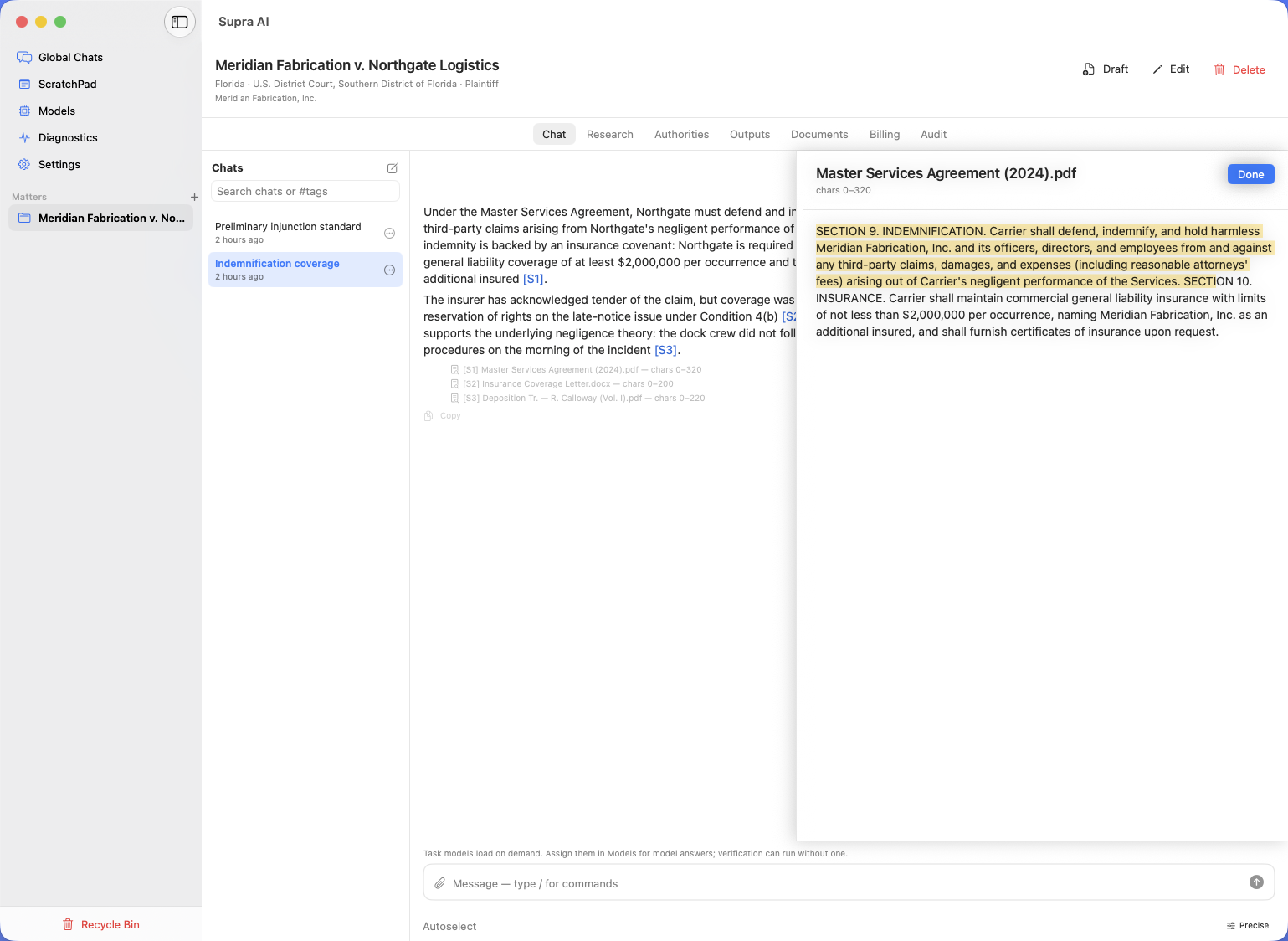
A matter chat answering who the parties are, with the sources it relied on listed below the answer and the cited court filing open beside the conversation at the supporting page.
Public court records — no client data

Research workflow

Plan the search. Review every result. Keep what holds up.

Research runs as an auditable session: queries you approve, then a keep-or-skip decision on every result. Each case carries its citation, court, date, docket, and matching excerpt.

Saved authorities keep their full text on your Mac, so follow-up research answers from your own library first — offline — reaching the network only when you ask for a wider search.

The same workflow reaches beyond case law to public records — SEC EDGAR filings, CFPB complaints, and NLRB records — each shown as a sourced filing, never a finding.
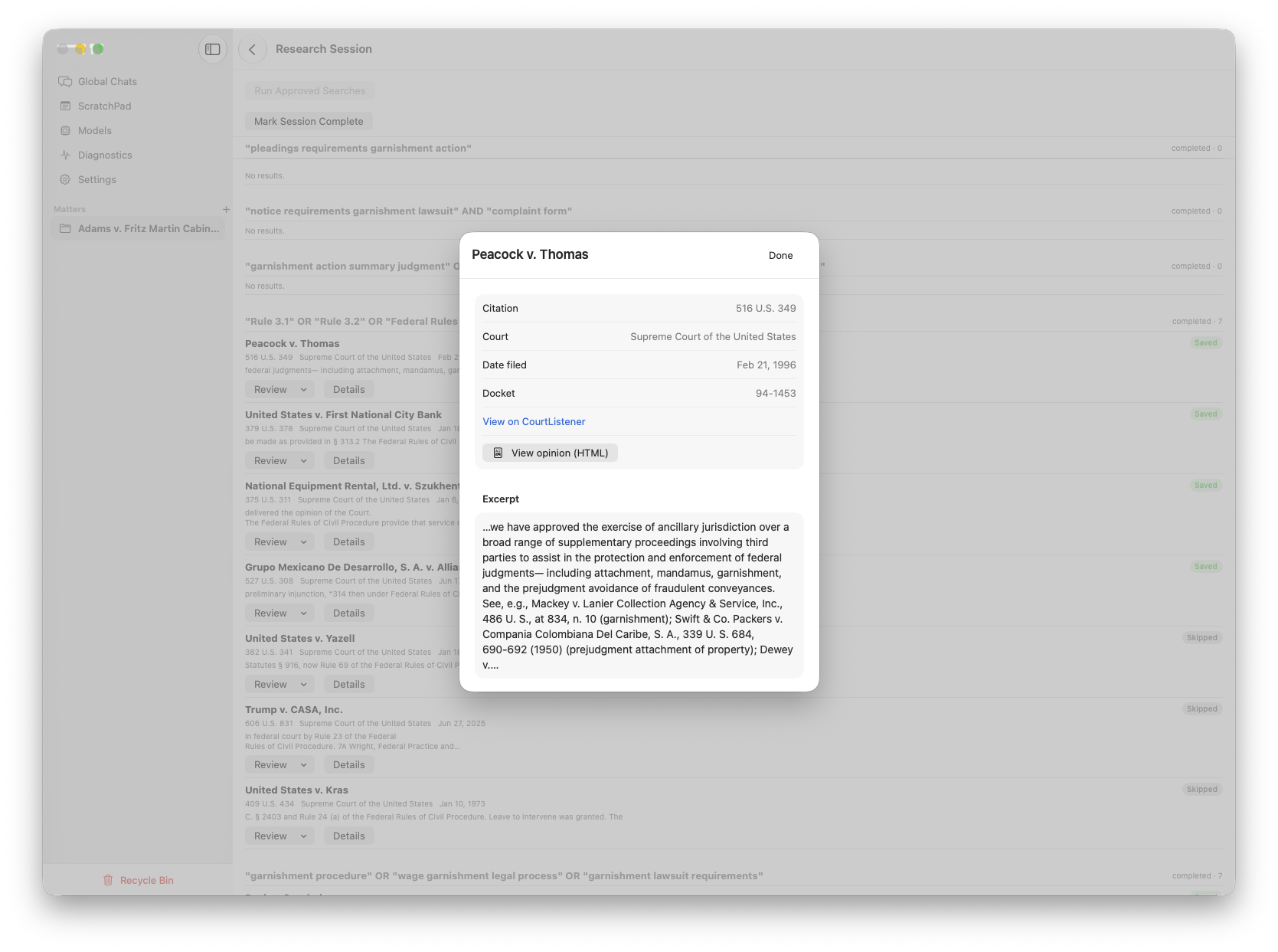
A research session showing search queries and retrieved Supreme Court cases with review status badges, and a detail card for one case showing its citation, court, docket number, and excerpt.
Real case law

Legal research

Read the opinion without leaving the app.

Any retrieved case — or [A#]citation — opens as the full opinion inside the app: the court’s own text, the cited passage highlighted, and a link to the case on CourtListener.

Cited answers are verified against that same text: an unsupported cite is flagged, or the answer blocked, before you rely on it.
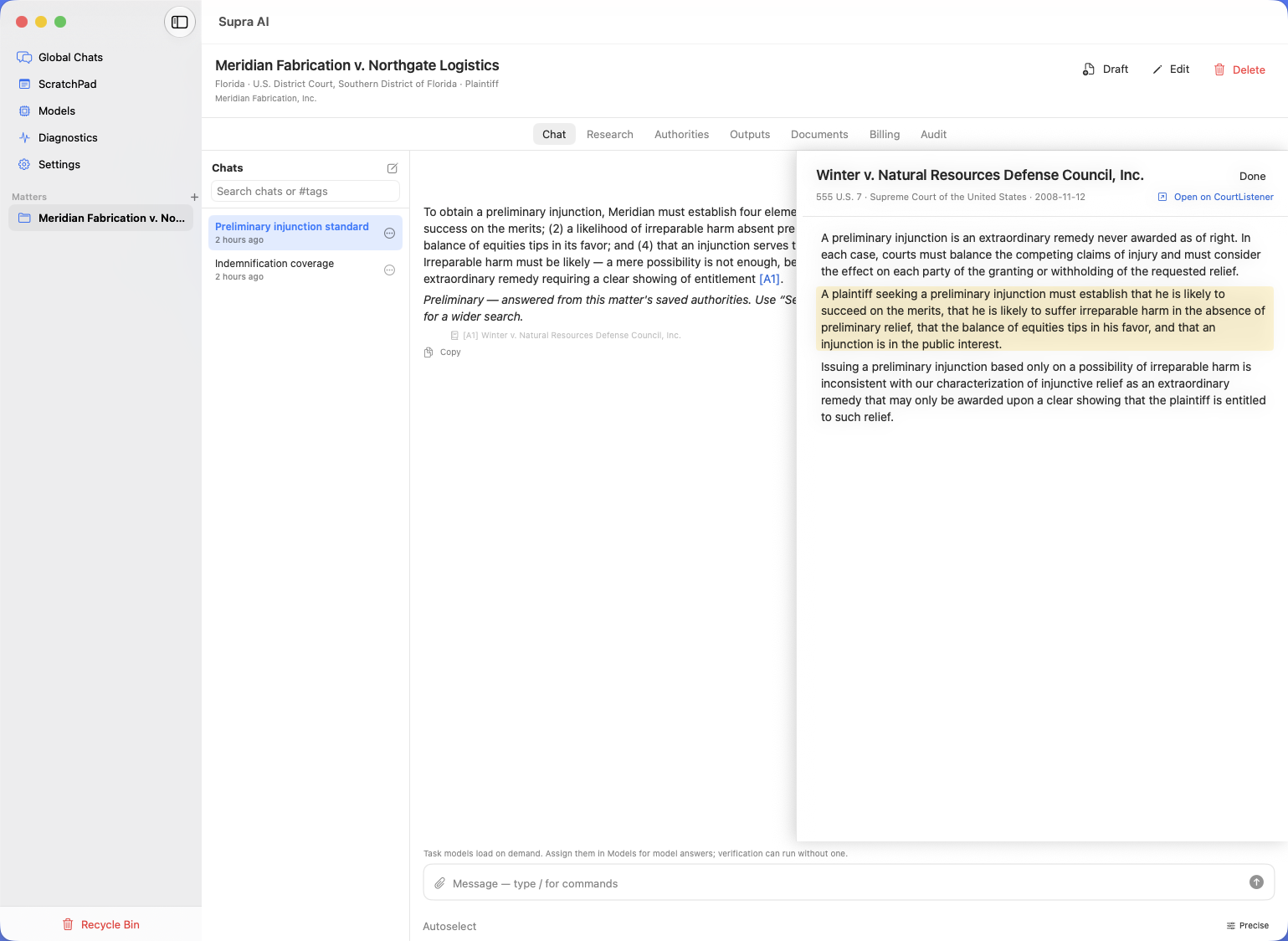
The full text of a Supreme Court opinion open inside the app, with a Download HTML option.
Real case law

Local models

The models live on your Mac — and you're in charge of them.

Download open-weight MLX models once and assign them per task — reasoning for research, an instruct model for drafting, a critic for review. They run on your Apple Silicon; nothing leaves for a cloud model.

That’s the whole subscription story: hardware you own running models you chose, with nothing metered and no account behind it.
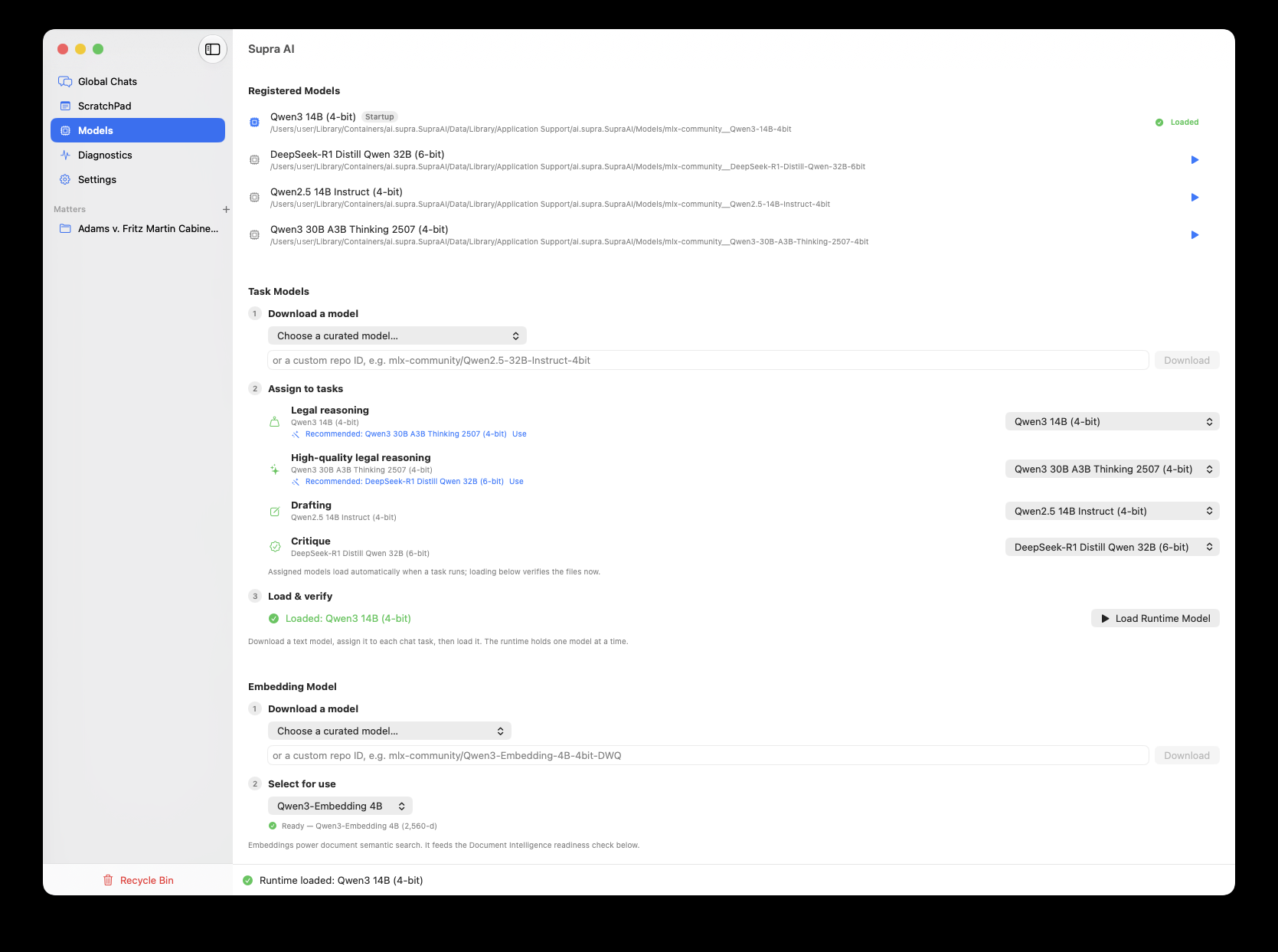
The Models tab showing registered local MLX models assigned to legal reasoning, drafting, and critique tasks, with a loaded runtime.
No client data

Source grounding

See Supra.

In legal writing, supra points to authority already on the page. Supra AI works the same way: an answer remains linked to the source behind it.

01

The answer

Responses read like an ordinary chat answer — clear prose, not a wall of hedged citations.

02

Its sources, right below

Every source behind the answer is listed beneath it, each linking to the exact passage of the document or opinion it came from.

Capabilities

Built for legal work that stays grounded.

Supra AI combines local generation with case-law and public-records research, document intelligence, drafting, timekeeping, and review workflows designed for attorneys.

Featured

Local generation

Supra AI runs models locally on Apple Silicon, so your files and prompts do not need to leave your Mac for generation.

MLX runtime · Local model · On-device embeddings

Case-law research
Legal answers are constrained to retained authority packets. A matter uses its saved authorities first; a wider CourtListener search is one click away. Party and docket questions can retrieve PACER/RECAP filing data.
Public records search
Search official government data alongside case law: SEC EDGAR filings (10-K, 10-Q, 8-K), the CFPB complaint database, and NLRB labor records — shown as sourced filings and allegations as filed, never findings, and never fed to the model as fact.
Citation verification
Citation labels are resolved against retained sources and material propositions receive a separate support check. Unsupported, unresolved, or fabricated authority is flagged or blocked; this is not a citator or good-law opinion.
Document intelligence
Import matter documents and ask source-scoped questions — a focused answer with a full-file pass one click away, and [S#] labels that resolve to retained source locators or force review.
Primary law from official text
Statutory and regulatory questions ground in the official text itself — U.S. Code from GovInfo, CFR with effective dates from eCFR — with a currency caveat when a source can't vouch for freshness.
Timekeeping & billing
ScratchPad captures the day as you work — quick notes tagged with @matter and #activity — then generates polished, UTBMS-coded billing narratives you review before anything counts. Tag an entry #Note to keep it out of billing entirely. Export to LEDES 1998B, CSV, or the clipboard.
Matter workspace
Organize research, drafts, documents, authorities, billing, and a full audit trail by matter — sorted by client, practice area, name, or date (or pinned and hand-ordered), with documents in nested folders and an in-app reader for saved opinions that works offline.
Legislative & regulatory tracking
Pending bills and rulemaking appear as clearly-labeled tracking context — from the Federal Register, Regulations.gov, and OpenStates — never passed off as citable authority.
Document drafting
Draft inside a matter's chat: a Draft button collects required details for a Florida Notice of Appearance or demand letter. The pre-file gate blocks rendering when required facts, authority support, or verification provenance are missing, unsupported, or unverifiable.

Why it’s different

Legal AI should not require surrendering the file — or renting it back.

Privacy

Your file stays local for processing.

  • Generation, indexing, embeddings, and drafting run locally on Apple Silicon; the app does not attach prompts, documents, or work product to cloud-generation requests.
  • Supra AI has no cloud-generation or training backend. Local models arrive pre-trained and change when you install a provider version.
  • Outbound paths are named and tested: provider-specific research requests, model metadata/artifact downloads, opinion downloads, and signed update checks/downloads.
  • Research query terms are replaced with per-install keyed pseudonyms in local logs by default; raw local logging is opt-in.

Security

Built like it holds a client file — because it does.

  • Sandboxed, hardened-runtime, and notarized by Apple. The model runtime runs in a separate isolated process.
  • Application research networking is default-deny and provider-scoped. The application contains no analytics or telemetry client.
  • Release builds read optional provider credentials from the device-bound macOS Keychain and scope them to the matching provider.

No subscriptions

No account. No seat license. No meter running.

  • Download the app and use it. There is nothing to sign up for, no monthly bill, and no per-token charge — the models run on hardware you already own.
  • Research is built on free public legal data. A free CourtListener account unlocks case-law search; other sources need no key at all or offer free keys you control.
  • There is no Supra AI account, cloud work store, or usage-metering backend.

Research sources

Standing on the shoulders of open law.

Supra AI doesn’t resell legal data. Its case-law, statutory, and public-records research runs on public sources — nonprofits and government services making the law free to everyone. If Supra AI is useful to you, please consider supporting them.
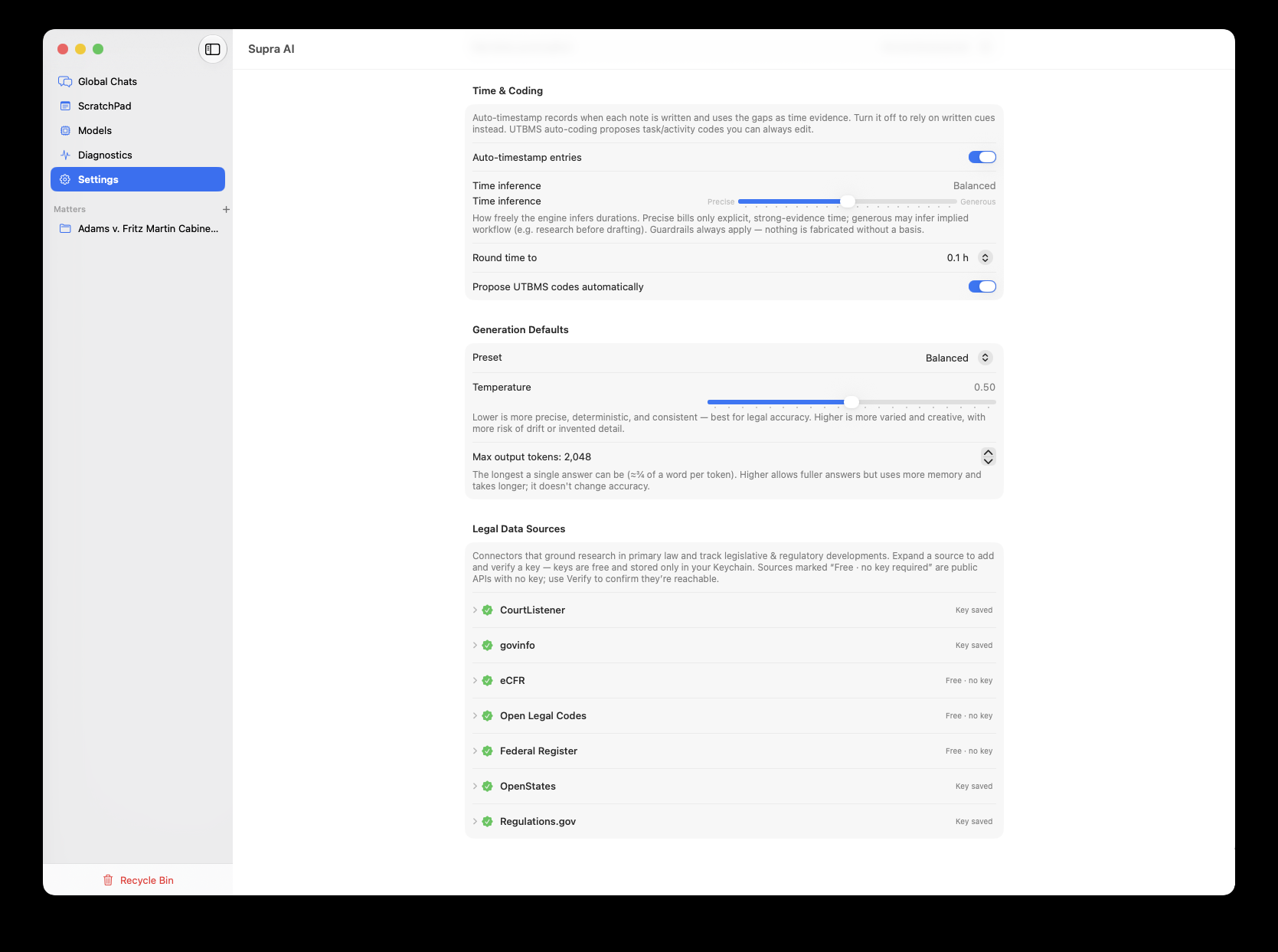
The app's Legal Data Sources settings listing each connector with its key status — several marked 'Free · no key' — with keys stored in the macOS Keychain.
Every source, its cost, and its key status — inside the app
CourtListener — Free Law Project
Case law and federal dockets (PACER/RECAP). A 501(c)(3) nonprofit that has made court records free for over a decade.
Donate to Free Law Project
Open Legal Codes
A free, key-less backbone for the U.S. Code, the CFR, and all fifty states' statutes.
OpenStates
Open data on state legislators, bills, and votes — powering state legislative tracking.
GovInfo
Official United States Code section text.
eCFR
Code of Federal Regulations, with effective dates.
Federal Register
Federal rules, proposed rules, and notices.
Regulations.gov
Rulemaking dockets and public comments.
SEC EDGAR
Public company filings — 10-K, 10-Q, and 8-K.
CFPB
The consumer-complaint database.
NLRB
Labor-case records and election results.

Legal-data requests are limited to these named hosts and rate-limited to stay a good citizen of the services that keep the law open. Local audit records replace query terms with per-install keyed pseudonyms by default; raw local logging is opt-in.

Secure legal AI without compromise.See Supra.

Download for macOS →